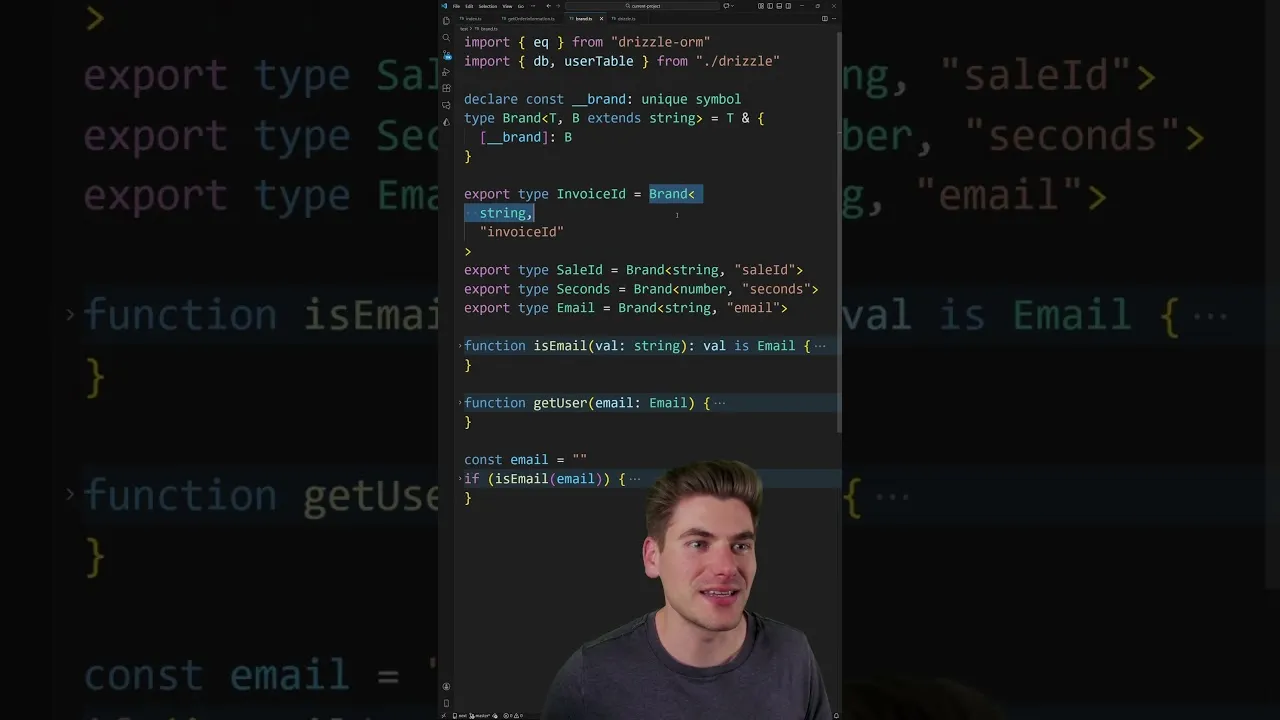
Master TypeScript Branded Types for Enhanced Project Safety
TypeScript’s power lies in its ability to catch errors before runtime. While basic types like strings and numbers are fundamental, large projects often require more nuanced type safety. This is where branded types shine.
They allow you to create distinct types from existing ones, ensuring that a string intended for an invoice ID isn’t accidentally used as a sale ID. This article will guide you through understanding and implementing branded types in your TypeScript projects, enhancing type safety and preventing common errors.
What You Will Learn
- How to define and use branded types in TypeScript.
- The problem branded types solve, particularly with IDs and unique identifiers.
- How to leverage branded types for data validation.
- Practical examples of branded types in action.
Prerequisites
- Basic understanding of TypeScript syntax and types.
- Familiarity with JavaScript concepts.
Understanding the Problem: Generic Types
Consider a scenario where you have different types of IDs, all represented as strings. For instance, you might have an invoiceId and a saleId. In plain TypeScript, both would simply be of type string.
This can lead to errors where you might accidentally pass a saleId to a function expecting an invoiceId, or vice versa. TypeScript, in its basic form, wouldn’t flag this as an error because both are just strings.
Let’s illustrate with an example. Imagine a function getOrder(invoiceId: string) that expects a specific invoice ID. If you try to pass a variable that holds a sale ID, even if it’s also a string, TypeScript won’t complain:
// Hypothetical scenario without branded types
function getOrder(invoiceId: string) {
 console.log(`Fetching order for invoice: ${invoiceId}`);
}

const latestSaleId = "sale-123";

// This would NOT cause a TypeScript error without branded types
// getOrder(latestSaleId);
This lack of specificity can lead to runtime bugs. Branded types solve this by creating unique, distinct types even when they are based on the same underlying primitive type.
Step 1: Defining a Branded Type
Creating a branded type involves a simple yet clever TypeScript technique. You essentially create a new type that is an intersection of the base type (like string or number) and a unique property. This unique property acts as the “brand” that differentiates it from other types based on the same primitive.
Here’s how you can define a branded type for an InvoiceId:
- Declare a unique symbol or key: This will serve as the differentiator. It’s common practice to use a
constwith a unique symbol for this. - Define the branded type using an intersection: Combine the base type (e.g.,
string) with an object type that includes the unique key.
The following code demonstrates this:
// 1. Define a unique brand key
const invoiceIdBrand = Symbol('InvoiceId');

// 2.
Define the branded type
type InvoiceId = string & { [invoiceIdBrand]: typeof invoiceIdBrand };

// Helper function to create branded types (optional but recommended)
function createInvoiceId(id: string): InvoiceId {
 // This assertion is safe because the runtime value is still a string.
 // The brand is only for TypeScript's type checking. Return id as InvoiceId;
}
Explanation:
const invoiceIdBrand = Symbol('InvoiceId');: We create a unique JavaScript Symbol. Symbols are guaranteed to be unique, preventing accidental name collisions.type InvoiceId = string & { [invoiceIdBrand]: typeof invoiceIdBrand };: This is the core of the branded type. It declares that anInvoiceIdis astringAND it must have a property named by our unique symbol (invoiceIdBrand) with a specific type (typeof invoiceIdBrand, which is the symbol itself).function createInvoiceId(id: string): InvoiceId: This helper function takes a regular string and asserts it as anInvoiceId. At runtime, it's still just a string. The brand is purely a compile-time construct for TypeScript.
Tip: Using a Brand Helper
To make the creation of branded types more concise, you can create a generic helper function. This makes it easier to create brands for different types (strings, numbers, etc.).
function createBrand<T, K extends string>(type: K) {
 // The brand is a unique symbol generated based on the type name
 const brand = Symbol(type);
 // Return a function that creates the branded type
 return (value: T): T & { [brand]: K } => value as T & { [brand]: K };
}

const createInvoiceId = createBrand<string, 'InvoiceId'>();
const createSaleId = createBrand<string, 'SaleId'>();

const myInvoiceId = createInvoiceId("inv-001");
const mySaleId = createSaleId("sale-xyz");
Step 2: Using Branded Types for Type Safety
Now that you have defined your branded types, you can use them in your functions and variables to enforce type safety. Let's revisit the getOrder function example.
Modify the function signature to accept the specific InvoiceId type:
function getOrder(invoiceId: InvoiceId) {
 console.log(`Fetching order for invoice: ${invoiceId}`);
}

// Assume createInvoiceId and createSaleId are defined as above
const validInvoiceId = createInvoiceId("inv-987");
const invalidSaleId = createSaleId("sale-abc");

// This works correctly
getOrder(validInvoiceId);

// This will now cause a TypeScript error!
// getOrder(invalidSaleId);

// This will also cause a TypeScript error!
// getOrder("inv-123");
When you try to pass invalidSaleId or a plain string "inv-123" to getOrder, TypeScript will now raise an error because they do not match the required InvoiceId type. This prevents you from accidentally mixing up different types of IDs, even if they are fundamentally strings.
Expert Note: Runtime vs. Compile-Time
It's crucial to remember that branded types are a compile-time safety feature. In the compiled JavaScript code, there is no difference between a regular string and a branded string type.
The brand (the symbol property) does not actually exist in the JavaScript output. Its sole purpose is to be checked by the TypeScript compiler.
Step 3: Branded Types for Validation
Branded types are not just for differentiating IDs; they are also excellent for representing validated data. For example, you can create a branded type for a validated email address.
First, define a type predicate function that checks if a string is a valid email:
// Define a type for validated email
type Email = string & { __brand: 'Email' }; // Using a string literal for simplicity here

// Type predicate function
function isEmail(value: string): value is Email {
 // A simple regex for demonstration purposes
 const emailRegex = /^[w-.]+@([w-]+.)+[w-]{2,4}$n);
 return emailRegex.test(value);
}

// Helper to create validated emails
function createValidatedEmail(email: string): Email {
 if (!isEmail(email)) {
 throw new Error(`Invalid email format: ${email}`);
 }
 return email as Email;
}
Now, you can use this branded type to ensure that only validated emails are passed to functions that require them:
function sendWelcomeEmail(to: Email) {
 console.log(`Sending welcome email to: ${to}`);
}

const userEmail = "[email protected]";
const invalidInput = "not-an-email";

try {
 const validatedEmail = createValidatedEmail(userEmail);
 sendWelcomeEmail(validatedEmail);

 // This would cause a type error if uncommented:
 // sendWelcomeEmail(invalidInput);

} catch (error) {
 console.error(error.message);
}
In this example, isEmail acts as a type guard. When it returns true, TypeScript knows that the input string conforms to the Email type. The createValidatedEmail function ensures that we only create instances of Email after validation.
Warning: Type Assertions
When creating branded types, you'll often use type assertions (e.g., as InvoiceId). While this is necessary for the TypeScript compiler, be mindful that these assertions bypass some type checking. Ensure your logic (like the helper functions) correctly enforces the intended constraints before asserting the type.
Step 4: Integration with Libraries
Many libraries, especially those dealing with databases or data manipulation, can benefit greatly from branded types. For instance, ORMs like Drizzle often have mechanisms to attach metadata or custom types to your database columns. You can use branded types to represent your primary keys, foreign keys, or other specific identifiers directly within your type definitions.
While the specifics vary by library, the principle remains the same: define your branded types and then use them where the library expects specific, distinct types for identifiers or validated data.
Conclusion
Branded types are a powerful, albeit often overlooked, feature in TypeScript. They provide a robust way to add granular type safety, especially in large codebases where distinguishing between semantically different but structurally similar types (like various string IDs) is critical. By implementing branded types, you can catch a significant class of errors at compile time, leading to more reliable and maintainable code.
Source: This Unknown TypeScript Feature is a Must Have for Large Projects (YouTube)