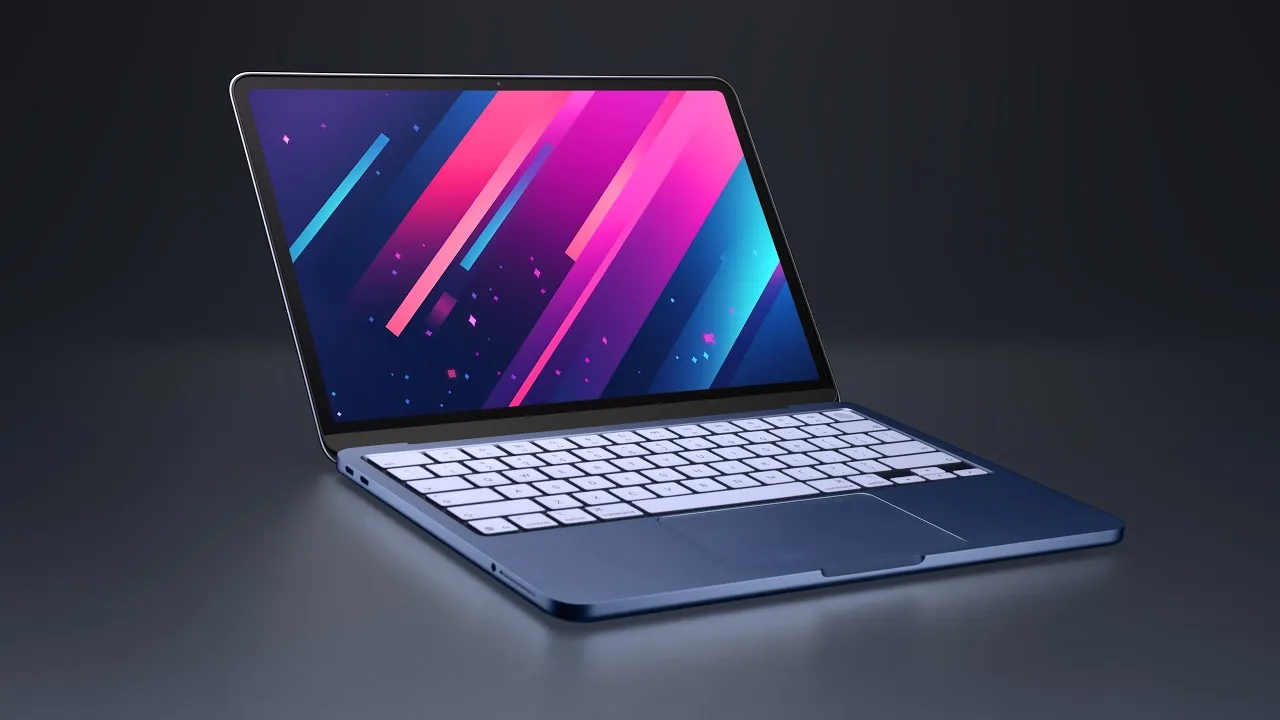
MacBook Neo: A Budget Apple Laptop That’s Almost TOO Cheap
Apple’s new MacBook Neo has landed, and it’s shaking up the entry-level laptop market with a price that makes you wonder if it’s too good to be true. After spending several days with the Neo as my sole computing device, I can confirm it’s a competent machine, but its aggressive pricing comes with compromises that might make it an ‘automatic’ choice for some, but not all.
First Impressions: Premium Build, Budget Price
Unboxing the MacBook Neo reveals a familiar Apple touch: a ‘hello’ message on the paper wrapper. Inside the box, you’ll find a 20-watt adapter and a charging cable. What immediately stands out is the laptop’s construction.
It’s a beautifully built aluminum unibody, a rarity in the sub-$600 price bracket. Most laptops at this price point typically resort to cheaper plastics, but the Neo feels remarkably solid and premium. The ‘indigo’ blue color I tested is striking, and it even has matching color-keyed screws and feet, a nice touch for those who appreciate attention to detail.
The one-hand openable hinge is another engineering feat often found on more expensive machines. It’s proof of good design when a lid can be lifted smoothly and stays put without wobbling. This is something Apple has mastered, and seeing it on such an affordable device is impressive.
Screen and Performance: Capable, But Not Class-Leading
The 13-inch display on the MacBook Neo is pleasing to the eye, offering good color coverage for everyday tasks. While it’s a 60Hz panel and doesn’t reach the full P3 color gamut found on the MacBook Air, most users won’t notice or care unless they’re involved in professional photo or video editing. For general browsing, document work, and media consumption, it’s one of the best screens you’ll find in this price range.
Under the hood, the Neo is powered by a chip originally designed for a phone, paired with 8GB of RAM. Don’t let that fool you; performance is surprisingly brisk. Everyday tasks like web browsing, email, and document editing are handled with ease.
Even light photo editing and some basic video work are feasible, which is remarkable given the hardware’s origins and the device’s cost. The integrated GPU is capable enough for casual gaming, though demanding titles will struggle. The SSD offers read speeds around 1,600 MB/s, ensuring that disk swapping is responsive.
The 8GB RAM Bottleneck
The most significant limitation of the MacBook Neo is its fixed 8GB of RAM. Apple’s silicon is efficient, and macOS performs well, but pushing the system with more demanding applications like Xcode, extensive video editing with multiple layers, or working with very large photo files in Photoshop will reveal the constraints.
Multitasking can become sluggish, and you’ll start to feel the system strain. While Apple designs this for the education market and users who don’t require extreme performance, potential buyers should be aware that this 8GB configuration might feel dated sooner than a 16GB model, especially looking five years down the line.
Keyboard, Trackpad, and Other Features
The keyboard offers a familiar and comfortable typing experience, closely matching the feel of its more expensive siblings. The trackpad, however, is a surprising departure. For over a decade, Apple has exclusively used haptic trackpads with no moving parts.
The Neo, however, features a new mechanical trackpad. Despite being a budget component, Apple has engineered it exceptionally well.
It offers a satisfying click that registers regardless of where you press, a significant improvement over many Windows laptop trackpads. While it doesn’t quite match the flawless precision of Apple’s haptic trackpads—occasionally missing rapid clicks during intense drag-and-drop operations—it’s still a remarkably good trackpad for the price.
The webcam provides a decent image, and the microphone offers acceptable audio quality for calls. The speakers, despite their prominent size, are a letdown. They get loud but lack the low-end frequencies and overall richness expected from an Apple laptop, which is surprising given Apple’s history with excellent laptop audio.
Ports are limited to two USB-C ports (one USB 3, one USB 2) and a headphone jack on the left side. There’s no MagSafe charger, meaning one USB-C port is occupied when charging.
Battery Life and Charging
The 36.5 Whr battery offers good, though not exceptional, battery life. With moderate brightness, it can last through a school day, but heavy usage or high brightness will drain it faster. The included 20W charger is slow; while the Neo can accept up to 30W charging, a full charge still takes over an hour.
Who Should Buy the MacBook Neo?
If your budget is strictly capped at $500 and you need a capable laptop for everyday tasks, the MacBook Neo is arguably the best option available. It offers a premium build, a good screen, and decent performance that punches above its weight class. It’s an ideal choice for students, casual users, or anyone looking for an affordable entry into the Apple ecosystem.
MacBook Neo vs. MacBook Air
The real question for many will be whether to opt for the Neo or stretch for the MacBook Air. A refurbished M2 MacBook Air with 16GB of RAM can be found for around $760. The Air offers a significantly better experience across the board: a superior chip, a brighter and more color-accurate display, a backlit keyboard, better speakers, longer battery life, and the option for more RAM.
While the Neo is incredibly compelling at its price point, the MacBook Air represents a more complete and future-proof package for those who can afford the upgrade. The Neo feels almost too cheap, and the compromises made to achieve that price are noticeable when compared to the Air.
Verdict
The MacBook Neo is a remarkable achievement in budget laptop engineering. It delivers a premium feel and solid performance for its price.
However, the fixed 8GB of RAM and the compromises in speakers and trackpad precision prevent it from being a universal recommendation. It’s a fantastic option for budget-conscious buyers, but for those with a bit more flexibility, the MacBook Air remains the superior, albeit more expensive, choice.
Specs & Key Features
- Display: 13-inch, 60Hz, good sRGB coverage (not full P3)
- Processor: Apple Silicon (mobile-derived)
- RAM: 8GB (non-upgradable)
- Storage: SSD (approx. 1600 MB/s read)
- Build: Aluminum unibody
- Keyboard: Comfortable, non-backlit
- Trackpad: Mechanical, well-engineered but not haptic
- Ports: 2x USB-C (1x USB 3, 1x USB 2), 1x 3.5mm headphone jack
- Webcam: Decent quality
- Audio: Side-firing speakers, loud but lacking bass
- Battery: 36.5 Whr, good battery life with moderate use
- Charging: 20W adapter included (supports up to 30W)
- Colors: Indigo (Blue) and others
- Price: Starts around $500 (educational pricing)
Source: MacBook Neo Review – It Might Be TOO Cheap. (YouTube)