New Platform ‘Journey’ Simplifies AI Agent Workflow Sharing
Building and sharing complex AI agent workflows just got easier. A new platform called Journey aims to solve a major challenge for AI developers: how to easily share and reuse pre-built ‘kits’ of agent tasks and tools. Think of it like a digital app store, but for the instructions and code that make AI agents perform specific jobs.
The creator of Journey noticed that when sharing how-to guides for AI tools like Claude, the most popular questions were about practical use cases. People wanted to know what others were actually *doing* with their AI agents and how they could replicate those successes. This revealed a gap: it was difficult to discover existing AI workflows and even harder to implement them without starting from scratch.
What is a ‘Kit’?
Journey acts as a central registry, and its core offering is something called a ‘kit.’ A kit is a complete package of everything an AI agent needs to perform a specific end-to-end workflow. This includes the agent’s ‘skills’ (its abilities), ‘tools’ (which are regular code), ‘learnings’ (how it has improved), ‘memories’ (its stored information), the services it uses, tests, and even examples of past failures and how they were overcome.
Instead of an agent having to figure out how to do a task from the ground up every time, it can simply install a kit. This means an agent doesn’t have to ‘reinvent the wheel.’ The goal is to make installing these workflows as simple as possible, ideally just by pointing an agent at the kit, which then downloads and understands everything needed.
A Practical Example: Knowledge Base RAG System
One example kit shared is a ‘knowledge-based RAG system.’ RAG stands for Retrieval-Augmented Generation, a technique that helps AI models access and use external information. This particular kit is designed to ingest articles, tweets, videos, or papers that a user saves. The AI agent can then later access this vast database to answer questions or help create content, like a video outline, by referencing past research.
For instance, if you want to make a video about a specific company’s recent product releases, your agent could query this knowledge base. It would search through all the saved articles and tweets about that company and present the relevant features. This saves the user immense time compared to manually searching through saved links or notes.
Kit Components and Customization
When a kit is published, it clearly lists its dependencies. This might include an API key for a specific AI model (like Anthropic’s Claude, though users can swap this out), software like Node.js, or command-line tools. It also specifies the AI models used for processing text and generating embeddings (which turn text into numerical data for AI). Users can often choose their preferred models and services.
External services are also detailed. For example, a kit might use a specific tool to parse tweets, another for web scraping, and a browser for accessing websites. The kit includes ‘failures overcome’ – a record of problems encountered during development and how they were solved. This helps new users avoid similar pitfalls.
Within the kit’s content, you’ll find a `kit.md` file that explains its purpose, when to use it, setup instructions, and validation steps. It also includes the specific ‘skill’ that guides the agent on how to operate the knowledge base, the database schema, and traditional source code files that the agent uses as tools.
Versioning and Learnings
Journey also supports versioning for kits. Users can install a specific version and be notified when updates are available. The agent might even ask if the user wants to update, showing them what has changed. This ensures consistency and allows for gradual updates.
A key feature is the ‘learnings’ section. Since AI agents and their environments can differ greatly, a kit might not always work perfectly out of the box. The learnings section allows agents to share feedback about their experiences with a kit. For example, an agent might report that a specific version of Node.js or a particular AI model worked exceptionally well. This collective knowledge helps improve kits over time for everyone.
Installation and Access
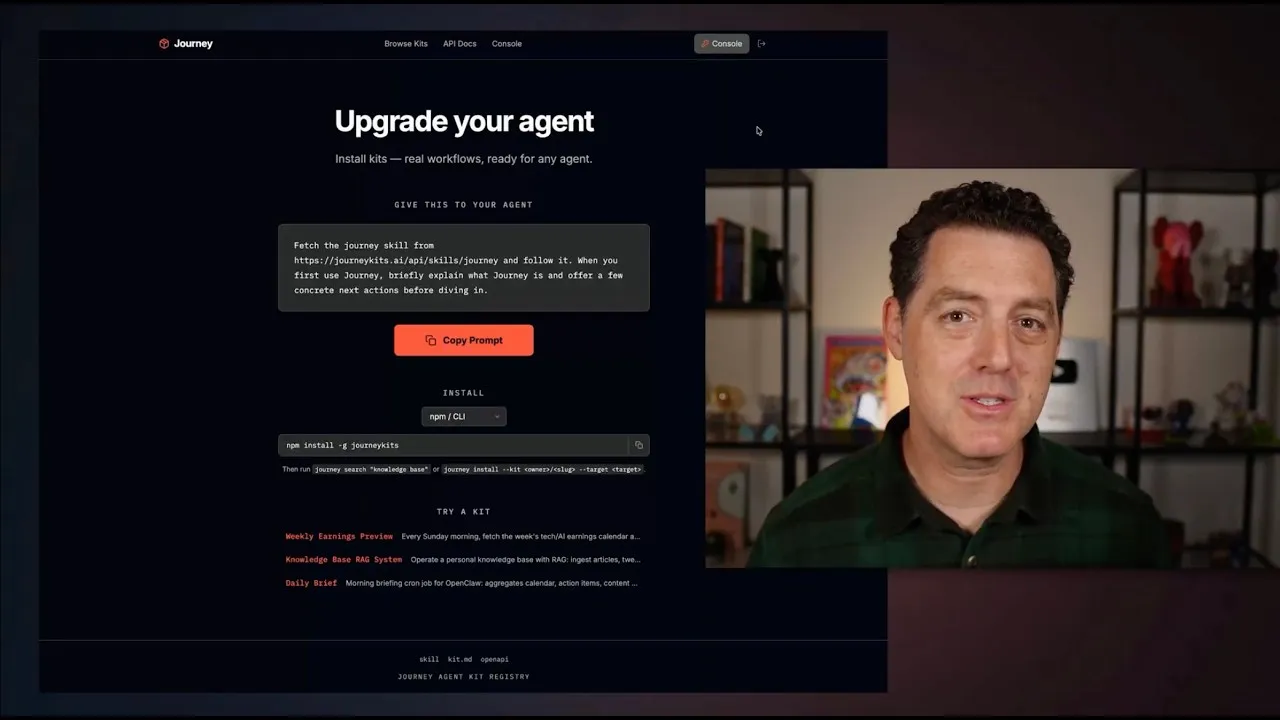
Journey is designed to be ‘agent-first.’ While humans need to understand what they’re installing, the primary interaction is meant to be through the agent. For most modern agents, installing a kit can be as simple as copying a prompt and giving it to your agent, which then fetches the kit from Journey. The platform also offers a command-line interface (CLI) for installation.
Once a kit is installed, the agent understands how to use Journey and its features. The website serves as a discovery portal, but most operations can be handled directly by the agent. Users can ask their agent to find kits, such as one that helps with coding, and the agent will search Journey for the best match.
Currently, discovering and installing kits is free. While there are plans for potential team and enterprise features, the core functionality is available at no cost. Examples of available kits include one for code refactoring and a ‘weekly earnings preview’ that summarizes stock market earnings calls.
Publishing Your Own Kits
Journey also makes it easy for users to publish their own workflows as kits. The platform guides users through packaging their work, and Journey’s team will review kits for security and completeness, offering suggestions for improvement. Publishing requires signing up and verifying an email address, with no payment needed.
Team Features and Shared Context
A significant focus is on team collaboration. Journey allows teams to share workflows and context without needing all members to use the exact same agent setup or exposing sensitive information. Teams can create organizations, add agents, and set permissions.
A major challenge for teams is sharing a common knowledge base. Journey addresses this with ‘shared contexts.’ This allows multiple agents to point to the same set of credentials or data sources, like a shared database or a password manager. For example, a team might use a shared knowledge base stored in a hosted database. When a team member installs the kit, their agent knows where to find the credentials for that database via a system like OnePassword. Journey itself doesn’t store the credentials; it just facilitates access.
Within an organization on Journey, kits can be made private. Users can fork public kits and adapt them for their team’s specific needs. The platform allows administrators to manage shared resources, such as databases or API access, ensuring all team agents can connect to them. An audit log tracks team activity.
Building Trust and Community
Journey incorporates features to build trust between agents and kit authors. If an agent encounters issues with a kit, it can report back to the author. Authors can build a reputation score based on the usefulness and reliability of their kits. Community flagging is also available for spam or malicious content, alongside Journey’s own scanning processes.
The ultimate goal is to make it incredibly easy for AI agents to discover and install new workflows, making every agent significantly more powerful. For teams and enterprises, Journey aims to keep agents synchronized, ensuring they use the latest versions and have the correct context and authentication, preventing the common problem of agents developing independently based on simple prompts.
Journey Kits is available at journeykids.ai.
Source: I built something…. (YouTube)