Anthropic Unveils Claude Code Remote Control, Bridging Desktop and Mobile AI
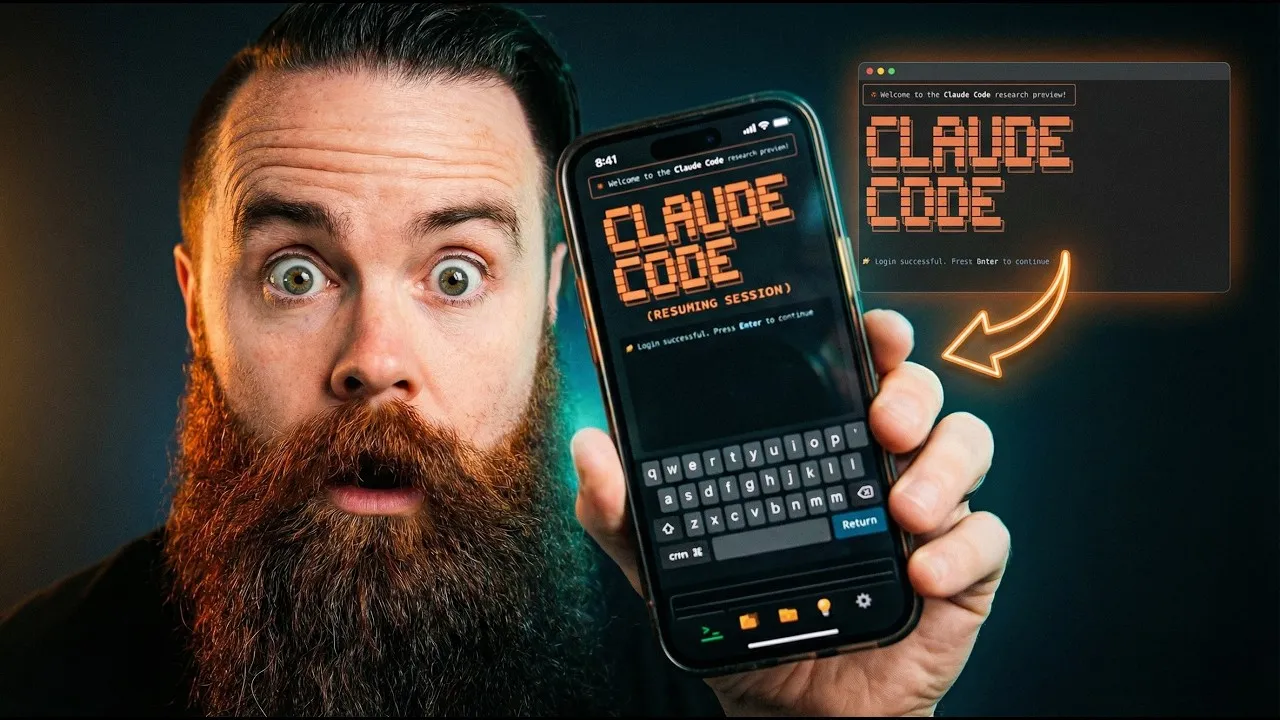
Anthropic has launched a groundbreaking feature for its AI coding assistant, Claude Code, enabling users to seamlessly control and interact with their desktop sessions directly from their mobile phones. Dubbed “Remote Control,” this new capability allows users to resume ongoing projects, start new sessions remotely, and leverage their machine’s full processing power and configured tools via the native Claude mobile app, fundamentally altering how developers and creators can work on the go.
Bridging the Gap: From Desktop to Pocket
Previously, using advanced AI coding tools like Claude Code while away from a primary workstation often required complex workarounds. Users might resort to setting up remote terminals or employing third-party solutions to access their development environments. The introduction of Claude Code Remote Control, however, streamlines this process dramatically. Users can now initiate or resume a Claude Code session on their laptop and then access it from their smartphone through the official Claude app, effectively bringing their powerful development environment into their pocket.
Seamless Session Resumption
The core of this new feature lies in its intuitive session management. Users can initiate the remote control function by typing a specific command, such as “/remote-control,” within their Claude Code terminal. This action allows their mobile Claude app to detect and display the active desktop session. From their phone, users can then resume the session exactly where they left off, maintaining context and continuity for their work. This eliminates the friction of re-establishing environments or losing progress when moving between devices or locations.
Starting New Remote Sessions
Beyond resuming existing work, Claude Code Remote Control also facilitates starting new sessions remotely. While the initial rollout may require initiating the session on the desktop first, the potential for a fully remote-initiated workflow is evident. This means users could, in theory, start a new project or task from their phone, leveraging their desktop’s resources without needing direct physical access to the machine.
Leveraging Full Machine Capabilities
A key differentiator highlighted by early users is that Claude Code Remote Control doesn’t just offer a stripped-down mobile interface. Instead, it appears to allow the mobile app to act as a conduit to the user’s primary machine. This means users can still access and utilize all the skills, tools, and processing power configured on their laptop or remote server. For instance, generating assets like video thumbnails or using specialized tools that are integrated into the desktop setup can be performed through the mobile interface, with the heavy lifting happening on the more powerful connected machine.
A Glimpse into the Future of AI-Assisted Work
This development positions Anthropic as a significant competitor in the AI-powered development space, potentially challenging existing platforms. The ability to manage complex coding tasks and AI interactions from a mobile device, without compromising access to full system capabilities, offers unprecedented flexibility. Early adopters have described the experience as “elegant” and “game-changing,” particularly for those who need to remain productive while traveling or away from their primary workstations.
Availability and Limitations
Claude Code Remote Control is currently in a research preview phase. Availability is reportedly limited, with early access granted to Mac users and potentially those with Claude Pro subscriptions. While the feature is highly functional, some users have noted minor limitations, such as the current inability to initiate entirely new sessions directly from the phone without some prior desktop interaction. Additionally, while file transfer capabilities are conceptually supported, direct file sending to the phone is not yet fully implemented, with generated assets appearing as concepts rather than directly downloadable files on the mobile device.
The “Ask” Tool Integration
The integration extends to Claude’s other functionalities, such as the “Ask” tool. Users can interact with prompts and questions from the “Ask” tool directly through their mobile interface, further enhancing the remote experience. This allows for a more conversational and guided interaction with Claude, even when accessed remotely.
Why This Matters
The implications of Claude Code Remote Control are far-reaching:
- Enhanced Productivity: Developers can continue working on projects from anywhere, transforming downtime into productive sessions.
- Democratized Access: It lowers the barrier to entry for using powerful AI coding tools, making them accessible via a readily available device like a smartphone.
- Flexible Workflows: It supports a more mobile and flexible work style, catering to the needs of remote workers, digital nomads, and those who travel frequently.
- Competitive Landscape: This move intensifies competition among AI providers, pushing for more integrated and user-friendly solutions across devices.
- Future of Development: It offers a preview of how AI assistants will become more deeply integrated into our daily workflows, blurring the lines between different computing environments.
Anthropic’s latest innovation with Claude Code Remote Control signifies a major step forward in making advanced AI development tools more accessible and integrated into everyday life. While still in its early stages, the feature promises to redefine productivity for a wide range of users.
Source: Claude Code on your Phone is OFFICIAL (it changes everything) (YouTube)