Learn to Build a Naive Bayes Text Classifier
In this tutorial, we’ll walk through the process of building a Naive Bayes text classifier using JavaScript and the p5.js library. This classic algorithm is a fundamental concept in machine learning and text analysis, providing a solid foundation before diving into more complex AI models. We’ll cover the core principles of Bayes’ theorem and how to apply them to categorize text data, all within a browser environment without needing GPUs or cloud servers.
Understanding Bayes’ Theorem Through an Example
Before coding, let’s grasp Bayes’ theorem with a practical scenario. Imagine a library where 1% of books are science fiction (sci-fi), and 99% are not. Of the sci-fi books, 80% have the word “galaxy” in their title. Of the non-sci-fi books, 5% also have “galaxy” in their title.
If you pick a book with “galaxy” in its title, what’s the probability it’s sci-fi? Intuitively, you might think it’s high because 80% of sci-fi books have “galaxy.” However, this overlooks the low prior probability of a book being sci-fi.
Let’s use concrete numbers. Assume 10,000 books:
- Sci-fi books: 1% of 10,000 = 100 books.
- Sci-fi books with “galaxy”: 80% of 100 = 80 books.
- Non-sci-fi books: 99% of 10,000 = 9,900 books.
- Non-sci-fi books with “galaxy”: 5% of 9,900 = 495 books.
The total number of books with “galaxy” in the title is 80 + 495 = 575.
The probability that a book with “galaxy” is sci-fi is the number of sci-fi books with “galaxy” divided by the total number of books with “galaxy”: 80 / 575 ≈ 0.139, or about 13.9%.
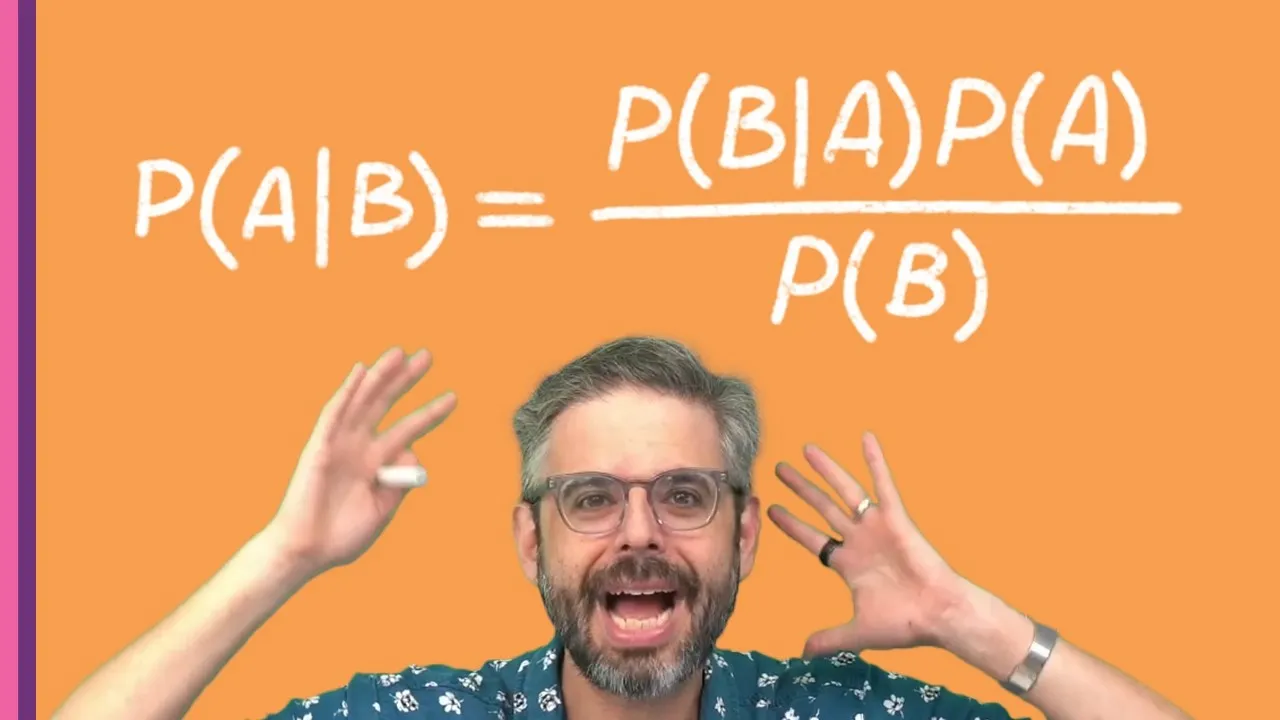
This calculation demonstrates Bayes’ theorem, which relates conditional probabilities. In formal notation, P(A|B) = [P(B|A) * P(A)] / P(B).
- P(A|B): Probability of A given B (Probability of sci-fi given “galaxy” in title).
- P(B|A): Probability of B given A (Probability of “galaxy” given sci-fi book).
- P(A): Prior probability of A (Probability of a book being sci-fi).
- P(B): Probability of B (Probability of “galaxy” in any book title).
The prior probability (P(A)) is crucial and often underestimated, influencing the final posterior probability.
Introducing Naive Bayes and the “Bag of Words”
For text classification, we often use Naive Bayes. The “naive” assumption is that the presence of one word in a document is independent of the presence of other words. This simplifies the calculation by treating the text as a bag of words, ignoring word order and grammatical structure.
To classify a piece of text, we calculate the probability of that text belonging to each category (e.g., positive, negative, sci-fi, romance) by multiplying the probabilities of each individual word appearing in that category, along with the prior probability of the category itself.
Prerequisites
- Basic understanding of JavaScript.
- Familiarity with the p5.js library (or willingness to learn).
- A modern web browser.
Step 1: Setting Up the Classifier Structure
We’ll create a JavaScript class to manage our classifier. This class will store word frequencies, category counts, and provide methods for training and classifying.
Create a file named classifier.js and add the following structure:
class Classifier {
  constructor() {
    this.categories = []; // Stores all unique categories
    this.wordFrequencies = {}; // Stores word counts per category
    this.categoryCounts = {}; // Stores total documents and words per category
    this.totalDocuments = 0;
  }

  train(text, category) {
    // Training logic will go here
  }

  classify(text) {
    // Classification logic will go here
  }
}
In your index.html file, include the p5.js library and your classifier.js file:
<!DOCTYPE html>
<html lang="en">
<head>
  <meta charset="UTF-8">
  <meta name="viewport" content="width=device-width, initial-scale=1.0">
  <title>Naive Bayes Classifier</title>
  <script src="https://cdnjs.cloudflare.com/ajax/libs/p5.js/1.9.0/p5.min.js"></script>
  <script src="classifier.js"></script>
  <script src="sketch.js"></script>
</head>
<body>
</body>
</html>
Create a sketch.js file for your p5.js sketch. You’ll instantiate the classifier and call its methods here.
Step 2: Implementing the Training Function
The train function processes input text, updates word frequencies, and counts documents per category.
Add the following to your Classifier class in classifier.js:
train(text, category) {
  // Increment total documents
  this.totalDocuments++;

  // Update category counts
  if (!this.categoryCounts[category]) {
    this.categoryCounts[category] = { docs: 0, words: 0 };
    this.categories.push(category);
  }
  this.categoryCounts[category].docs++;

  // Split text into words (simple regex for alphanumeric sequences)
  const words = text.toLowerCase().match(/w+/g);

  if (!words) return; // No words found

  // Update word frequencies and category word counts
  for (const word of words) {
    // Initialize word entry if it doesn't exist
    if (!this.wordFrequencies[word]) {
      this.wordFrequencies[word] = {};
    }
    // Initialize category entry for the word if it doesn't exist
    if (!this.wordFrequencies[word][category]) {
      this.wordFrequencies[word][category] = 0;
    }

    // Increment counts
    this.wordFrequencies[word][category]++;
    this.categoryCounts[category].words++;
  }
}
Expert Note: The regular expression /w+/g is a basic way to extract words. For more sophisticated text processing, consider more advanced tokenization techniques.
Step 3: Implementing the Classification Function
The classify function takes new text and calculates the probability of it belonging to each known category.
Add the following to your Classifier class in classifier.js:
classify(text) {
  const words = text.toLowerCase().match(/w+/g);
  if (!words) return null; // Cannot classify without words

  let results = {};

  for (const category of this.categories) {
    // Calculate prior probability: P(category)
    let priorProbability = this.categoryCounts[category].docs / this.totalDocuments;

    // Start with prior probability for this category
    let categoryProbability = priorProbability;

    // Calculate likelihood for each word: P(word | category)
    for (const word of words) {
      let wordCountInCategory = 0;
      let totalWordsInCategory = this.categoryCounts[category].words;

      if (this.wordFrequencies[word] && this.wordFrequencies[word][category]) {
        wordCountInCategory = this.wordFrequencies[word][category];
      }

      // Calculate P(word | category) with Laplacian smoothing
      // Add 1 to numerator and total number of unique words + 1 to denominator
      // For simplicity here, we use a basic smoothing: (count + 1) / (total words + vocabulary size)
      // A more accurate vocabulary size would be needed for true Laplacian smoothing.
      // For this example, we'll approximate using totalWordsInCategory + a small constant.
      let wordProbability = (wordCountInCategory + 1) / (totalWordsInCategory + 10); // Approximation

      // Multiply probabilities together (log probabilities are often used to avoid underflow)
      categoryProbability *= wordProbability;
    }
    results[category] = categoryProbability;
  }
  return results;
}
Expert Note on Laplacian Smoothing: When a word from the input text has never been seen during training for a specific category, its probability would be zero. Multiplying by zero would make the entire probability for that category zero. Laplacian smoothing (adding a small value, typically 1, to the numerator and a corresponding value to the denominator) prevents this by ensuring every word has a non-zero probability.
Warning: The provided smoothing is a simplification. A more robust implementation would track the total number of unique words in the vocabulary to correctly apply the denominator in Laplacian smoothing.
Step 4: Using the Classifier in p5.js
Now, let’s use our classifier in the sketch.js file.
let classifier;

function setup() {
  createCanvas(400, 300);
  classifier = new Classifier();

  // --- Training Data Examples ---
  // Positive examples
  classifier.train("this is great", "positive");
  classifier.train("I am happy", "positive");
  classifier.train("what a wonderful day", "positive");
  classifier.train("This is awesome and amazing", "positive");

  // Negative examples
  classifier.train("this is bad", "negative");
  classifier.train("I am sad", "negative");
  classifier.train("what a terrible day", "negative");
  classifier.train("This is awful and horrible", "negative");

  // Neutral examples (optional)
  classifier.train("the book is on the table", "neutral");
  classifier.train("it is raining today", "neutral");

  console.log("Classifier trained.");
  console.log("Categories:", classifier.categories);
  console.log("Category Counts:", classifier.categoryCounts);
  // console.log("Word Frequencies:", classifier.wordFrequencies);
}

function draw() {
  background(220);
  fill(0);
  textSize(16);
  textAlign(CENTER, CENTER);
  text("Enter text to classify below.", width / 2, height / 2 - 30);

  // Example classification (you'd typically use an input field)
  let testTextPositive = "I am feeling great today";
  let testTextNegative = "This is a sad and terrible situation";
  let testTextNeutral = "The weather is cloudy";

  let resultsPositive = classifier.classify(testTextPositive);
  let resultsNegative = classifier.classify(testTextNegative);
  let resultsNeutral = classifier.classify(testTextNeutral);

  fill(0, 150, 0); // Green for positive
  text(`${testTextPositive}: ${JSON.stringify(resultsPositive)}`, width / 2, height / 2 + 10);

  fill(150, 0, 0); // Red for negative
  text(`${testTextNegative}: ${JSON.stringify(resultsNegative)}`, width / 2, height / 2 + 40);

  fill(100);
  text(`${testTextNeutral}: ${JSON.stringify(resultsNeutral)}`, width / 2, height / 2 + 70);

  noLoop(); // Only draw once
}
Tip: For a real application, you would replace the hardcoded classification calls in draw() with an HTML input field and a button to trigger classification dynamically.
Conclusion
You’ve now built a basic Naive Bayes text classifier in JavaScript! This foundational algorithm is powerful for text categorization tasks. While this implementation is simplified, it provides a clear understanding of the underlying principles. You can expand upon this by adding more training data, refining the text processing, and implementing more robust smoothing techniques.
Source: Coding Challenge 187: Bayes Theorem (YouTube)