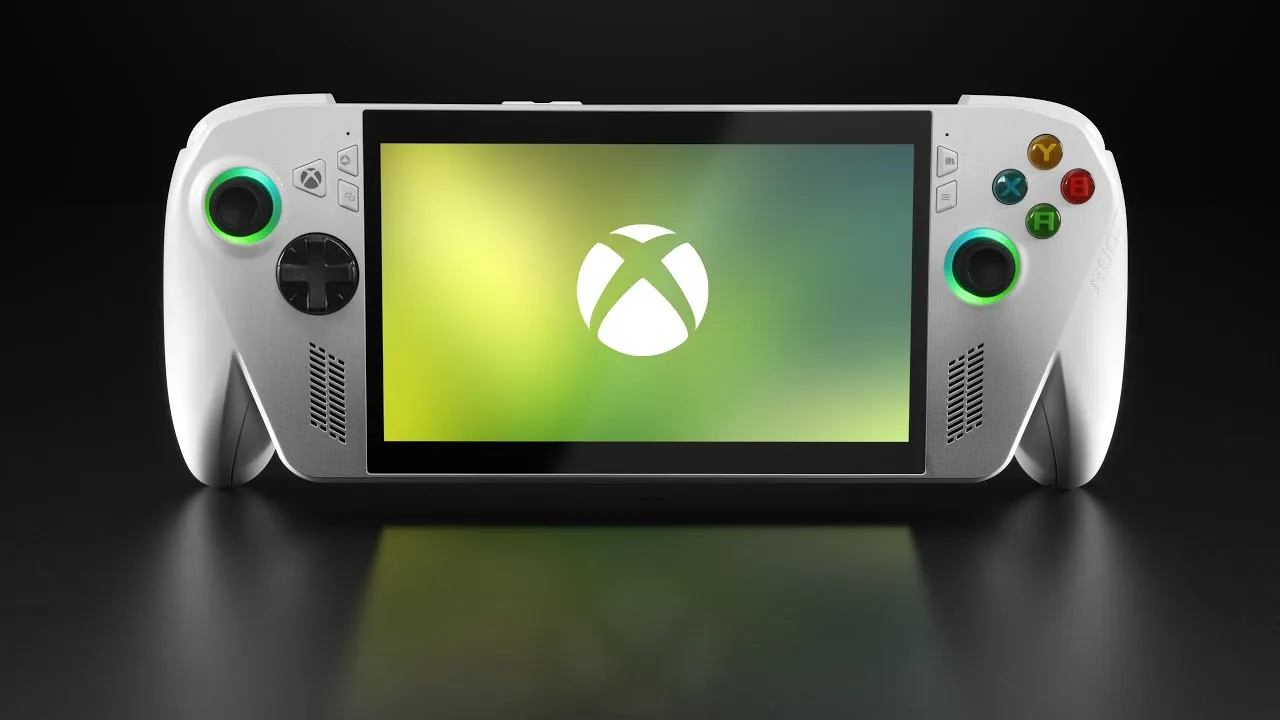
ROG Ally X: A Powerful Handheld, But Is It Truly Xbox?
The landscape of PC gaming handhelds has a new, potent contender with the arrival of the ROG Xbox Ally X. Branded with the iconic Xbox name and adorned in its signature green, these devices arrive with a significant weight of expectation. The core question on everyone’s mind: does the Ally X deliver the effortless, casual-friendly experience synonymous with Xbox consoles, and does its pricing align with that perception?
The Xbox Branding Conundrum
Upon first boot, the ROG Xbox Ally X presents a familiar Windows 11 interface. While this offers the flexibility of a full PC operating system, it starkly contrasts with the streamlined, console-like experience many would anticipate from an Xbox-branded product. Initial setup involves navigating standard Windows prompts, a process that feels out of place for an Xbox device. However, after about 15-20 minutes, the Ally X transitions into a full-screen Xbox UI, creating a more cohesive gaming environment. This custom Windows 11 build is designed to optimize performance by omitting the standard Windows desktop, taskbar, and background, purportedly saving around 2GB of RAM, though real-world measurements suggest closer to 1-1.5GB savings on the 16GB system.
A Unified Gaming Library
The custom Xbox UI is where the Ally X aims to bridge the gap between a PC and a console. It provides swift access to the Xbox Game Pass library, and both the standard Ally and the Ally X models come bundled with a 3-month subscription to Xbox Game Pass Ultimate. This is a generous offering, though the reviewer expressed a desire for the top-tier Game Pass Ultimate, which includes day-one access to new titles, particularly for the more premium Ally X. Crucially, this unified interface allows for the integration of games from various PC storefronts, including Steam, GOG, and Epic Games. Once installed and configured, these games appear within the Xbox UI, each clearly marked with an icon indicating its origin. This seamless integration allows users to launch and manage their entire PC gaming library from a single, Xbox-like dashboard.
Navigating the Windows Underbelly
A key feature highlighted is the ‘Xbox Full Screen Experience’ (FSE) and its associated app-switching capability. A long press of the Xbox button functions akin to Alt+Tabbing on a PC, revealing all open applications. While the FSE aims to keep users within a dedicated gaming environment, switching to the full Windows desktop environment loads those components into memory, and currently, there’s no immediate way to purge them without a system reboot. The app switcher itself is praised for its responsiveness, allowing for quick and easy closing of games and applications with a simple button press, often faster than traditional PC methods like Alt+F4.
Despite the seamlessness of the FSE, the reviewer noted occasional glitches, particularly controller focus issues when exiting Steam games. While these are often easily resolved by fiddling with the app switcher, they point to a potential frustration point for users less accustomed to the intricacies of Windows-based devices. The concern is that users expecting a purely plug-and-play Xbox experience might find these ‘quirks’ off-putting, especially if they grew up solely with traditional consoles.
Updates and User Experience Quirks
The update process on the Ally X also presents a potential hurdle. Beyond standard Windows updates, users must also navigate the ASUS Armory Crate software for BIOS and firmware updates. This dual-update system could be confusing for users not accustomed to managing PC hardware updates, leading to potential performance inconsistencies if not handled correctly, as evidenced by the need to re-benchmark after discovering the Armory Crate updates. Furthermore, the standard Windows lock screen and the pre-installation of Microsoft applications like Teams and OneDrive detract from the focused gaming experience expected from an Xbox product, with the reviewer suggesting these should be optional.
The Armory Crate software itself feels somewhat disconnected. While the Xbox button launches the FSE, the Armory Crate button brings up a widget within that experience, leading to a less cohesive user interface than one might expect from a unified Xbox product.
Ergonomics and Controls: A Step Forward
Where the ROG Xbox Ally X truly shines is in its controls and ergonomics. The reviewer lauded the redesigned sticks, buttons, D-pad, and triggers, noting subtle improvements that significantly enhance the tactile feel. The new sticks are slightly taller with improved grip, and the D-pad is a notable improvement. The most significant change, however, lies in the overall ergonomics. While initially visually striking, the new design feels exceptionally comfortable in hand, even surpassing the ergonomics of the popular Steam Deck for extended play sessions. Despite being heavier than the Steam Deck, the comfortable design makes them suitable for long gaming marathons.
Performance: Zen 2 vs. Zen 5
The ROG Xbox Ally comes in two main configurations. The standard model, often referred to as the ‘white’ version, utilizes the Z1A chip with Zen 2 architecture, offering performance comparable to the Steam Deck, with a slight edge on the higher end. The more powerful ‘black’ model, the Ally X, is equipped with the Z2 Extreme chip based on Zen 5 architecture. This chip is a strong performer, particularly excelling at lower wattages, where it significantly outperforms the previous generation’s Z1 Extreme. ASUS markets the Z1A for 720p gaming and the Z2 Extreme for 1080p, a reasonable distinction, though some demanding AAA titles may struggle even at 720p on the Z1A. Both devices are noted for being relatively quiet during gameplay, with the Ally X running slightly warmer and louder due to its more powerful chip. The reviewer also mentioned the absence of a true ‘quick resume’ feature, with the current implementation relying on Windows Sleep/Hibernate, which is less reliable.
Display, Connectivity, and Battery
The display remains unchanged from the previous generation – a non-OLED panel with relatively thick bezels, yet still considered a very good screen. This decision likely contributed to keeping the price point in check. Notably, the USB-C port on the Z2 Extreme version supports USB4, enabling the use of external GPUs for a significant performance boost, albeit at a considerable additional cost. Battery life is considered good, with the Ally X featuring a larger 80Wh battery compared to the standard Ally’s 60Wh, with expectations of further improvements through software updates.
Pricing and Market Positioning: The Elephant in the Room
The pricing of the ROG Xbox Ally X is a major point of contention. The $600 starting price for the base model and the $1,000 price tag for the Ally X are significantly higher than what one might expect from an ‘Xbox’ branded product, especially when compared to the sub-$500 price of Xbox consoles. The reviewer argues that the Xbox branding creates an expectation of subsidized pricing, a practice not evident here. Without this subsidy, the Ally X finds itself in direct competition with other Windows handhelds, where its pricing becomes more justifiable, albeit still on the higher end, being cheaper than some Legion offerings but still a substantial investment.
The surprising success of the Ally X pre-orders, selling out almost immediately and facing backorders until November, suggests a strong market demand for premium PC handhelds, even at the $1,000 mark. The reviewer posits that the Ally X is squarely aimed at the enthusiast market – experienced users who understand the implications of a $1,000 gaming handheld and what they are signing up for. For the $600 model, however, the reviewer anticipates a higher return rate, as users may find it ‘not Xbox enough’ and be disappointed by the Windows-centric experience.
Verdict: An Enthusiast’s Tool, Not a Console Replacement
Ultimately, the ROG Xbox Ally X is a powerful and capable Windows handheld with excellent controls and a refined user experience, especially for those familiar with PC gaming. However, its Xbox branding creates a disconnect. While the ASUS team has done well to create a familiar and inviting Xbox interface, the underlying Windows architecture inevitably surfaces, presenting quirks that may alienate users expecting a pure console experience. It’s a device that will likely improve with further software updates, but its success hinges on user expectations. For the PC gaming enthusiast seeking a premium handheld experience, the Ally X delivers. For those expecting a simple, console-like gateway into the Xbox ecosystem, the Windows underpinnings and the premium price point might prove to be a significant hurdle.
Source: ROG XBOX Ally X Review (YouTube)