How to Safely Access Nested Object Properties in JavaScript
Working with JavaScript objects, especially when dealing with nested structures, can sometimes lead to errors if a property or a nested property doesn’t exist. Attempting to access a property on undefined will throw a TypeError, potentially crashing your application. Fortunately, JavaScript provides a clean and concise solution: optional chaining.
In this tutorial, you will learn how to use the optional chaining operator (?.) to safely access nested object properties. We’ll cover how it prevents errors, demonstrate its usage with examples, and show how it simplifies code compared to traditional conditional checks.
Understanding the Problem
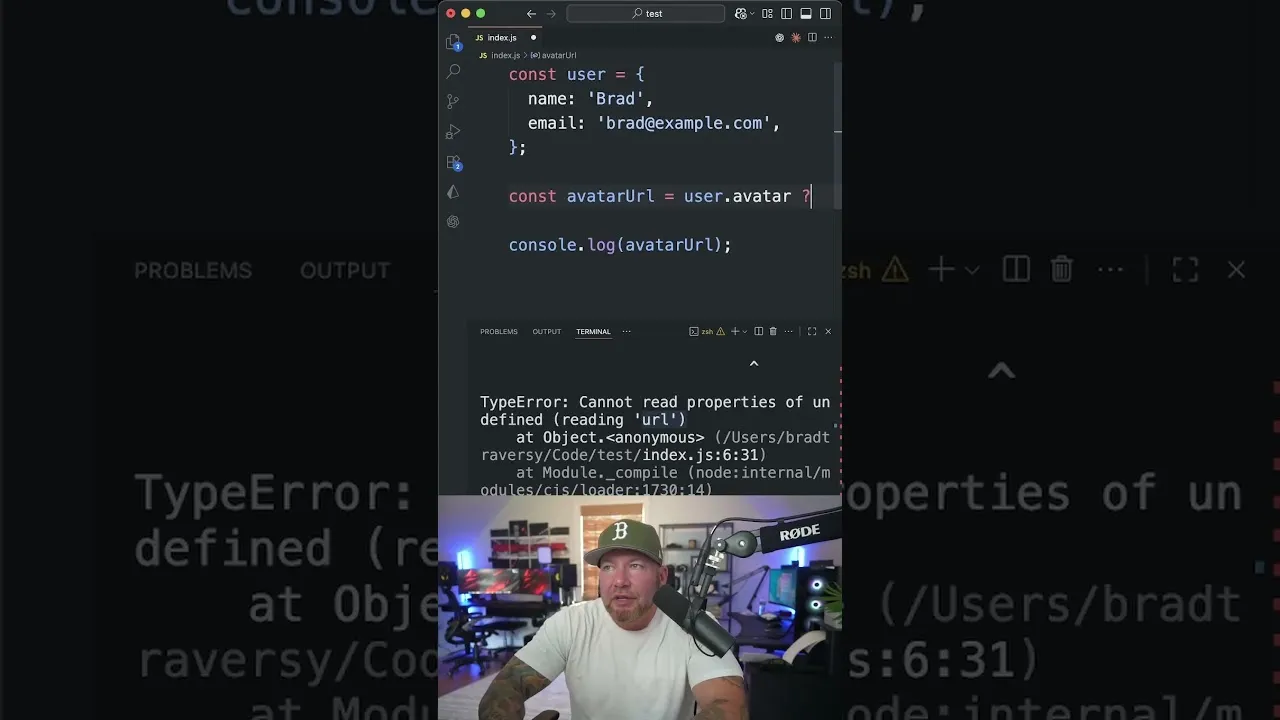
Let’s imagine you have a user object. This object might contain basic information like a name and email. However, it’s also possible that a user might have an avatar, but not always. If you try to access the URL of the avatar directly without checking if the avatar property exists, you’ll run into trouble.
Consider this scenario:
const user = {
  name: 'Alice',
  email: '[email protected]'
};

const avatarUrl = user.avatar.url;
console.log(avatarUrl);
When you run this code, you’ll encounter a TypeError:
TypeError: Cannot read properties of undefined (reading 'url')
This error occurs because the user object does not have an avatar property. Therefore, user.avatar evaluates to undefined. When you then try to access the url property on undefined, JavaScript throws an error.
Traditional Solutions (and their drawbacks)
Before optional chaining, developers would typically use conditional statements to prevent such errors. Two common approaches include:
1. Using an if statement:
let avatarUrl;
if (user.avatar) {
  avatarUrl = user.avatar.url;
}
console.log(avatarUrl); // Output: undefined (or the URL if user.avatar existed)
2. Using a ternary operator:
const avatarUrl = user.avatar ? user.avatar.url : undefined;
console.log(avatarUrl);
While these methods work, they can make your code verbose and harder to read, especially when dealing with deeply nested objects or multiple properties that might be missing.
Introducing Optional Chaining (?.)
Optional chaining is a modern JavaScript feature that provides a more elegant way to handle potentially missing properties. It allows you to read the value of a property located deep within a chain of connected objects without having to validate that each reference in the chain is valid.
The syntax involves adding a question mark (?) after the object or property you want to access, before the next property in the chain.
How to Use Optional Chaining
Identify the potentially missing property:
Look at the chain of properties you are trying to access. For example, in
user.avatar.url, bothavatarandurlcould potentially be missing.Apply the optional chaining operator:
Insert the
?.operator immediately after the property that might benullorundefined. If the expression to the left of the?.isnullorundefined, the expression short-circuits and returnsundefinedimmediately, without trying to access the property to the right.Let’s refactor the previous example using optional chaining:
const user = {
  name: 'Alice',
  email: '[email protected]'
};

const avatarUrl = user.avatar?.url;
console.log(avatarUrl); // Output: undefined
In this case,
user.avatarisundefined. Because of the?.operator, JavaScript doesn’t try to access.urlonundefined. Instead, the entire expressionuser.avatar?.urlevaluates toundefined, and no error is thrown.Handle nested structures:
Optional chaining works with multiple levels of nesting. You can chain multiple
?.operators together.Consider an object with even deeper nesting:
const userProfile = {
  name: 'Bob',
  profile: {
    details: {
      address: {
        street: '123 Main St'
      }
    }
  }
};

// Accessing a deeply nested property that exists
const street = userProfile.profile?.details?.address?.street;
console.log(street); // Output: '123 Main St'

// Accessing a deeply nested property that might not exist
const city = userProfile.profile?.details?.address?.city;
console.log(city); // Output: undefined

// If an intermediate property is missing
const missingIntermediate = userProfile.profile?.nonExistent?.property?.value;
console.log(missingIntermediate); // Output: undefined
As you can see, if any part of the chain (
profile,details,address) were missing orundefined, the expression would short-circuit and returnundefinedwithout throwing an error.
Benefits of Optional Chaining
- Prevents runtime errors: Eliminates
TypeErrorexceptions caused by accessing properties onnullorundefined. - Improves code readability: Replaces verbose conditional checks with a concise operator.
- Simplifies data fetching: Particularly useful when dealing with data from APIs, where the structure might not always be consistent.
Prerequisites
- Basic understanding of JavaScript objects and properties.
- Familiarity with
nullandundefinedvalues in JavaScript.
Conclusion
Optional chaining is a powerful and essential tool for modern JavaScript development. By using the ?. operator, you can write cleaner, safer, and more robust code when working with potentially incomplete or nested data structures.
Source: Optional Chaining in JavaScript (YouTube)