How to Trace Object Behavior in Python: A Step-by-Step Guide
Understanding how Python manages objects in memory and how methods interact with them is crucial for writing effective code. This guide will walk you through the process of tracing object creation, attribute assignment, and method calls, using a practical example with a `Triangle` class.
What You’ll Learn
In this tutorial, you will learn to:
- Understand how class definitions are processed by Python.
- Trace the creation of new objects and memory allocation.
- Follow the execution of the `__init__` method for object initialization.
- Observe how method calls, including the special `self` parameter, work.
- Understand how attributes are assigned and modified on objects.
- Track the flow of execution during method calls and returns.
- Recognize the concept of mutability and its impact on objects.
Prerequisites
- Basic understanding of Python syntax, including variable assignment and function calls.
- Familiarity with the concept of classes and objects in Python.
Step 1: Defining a Class
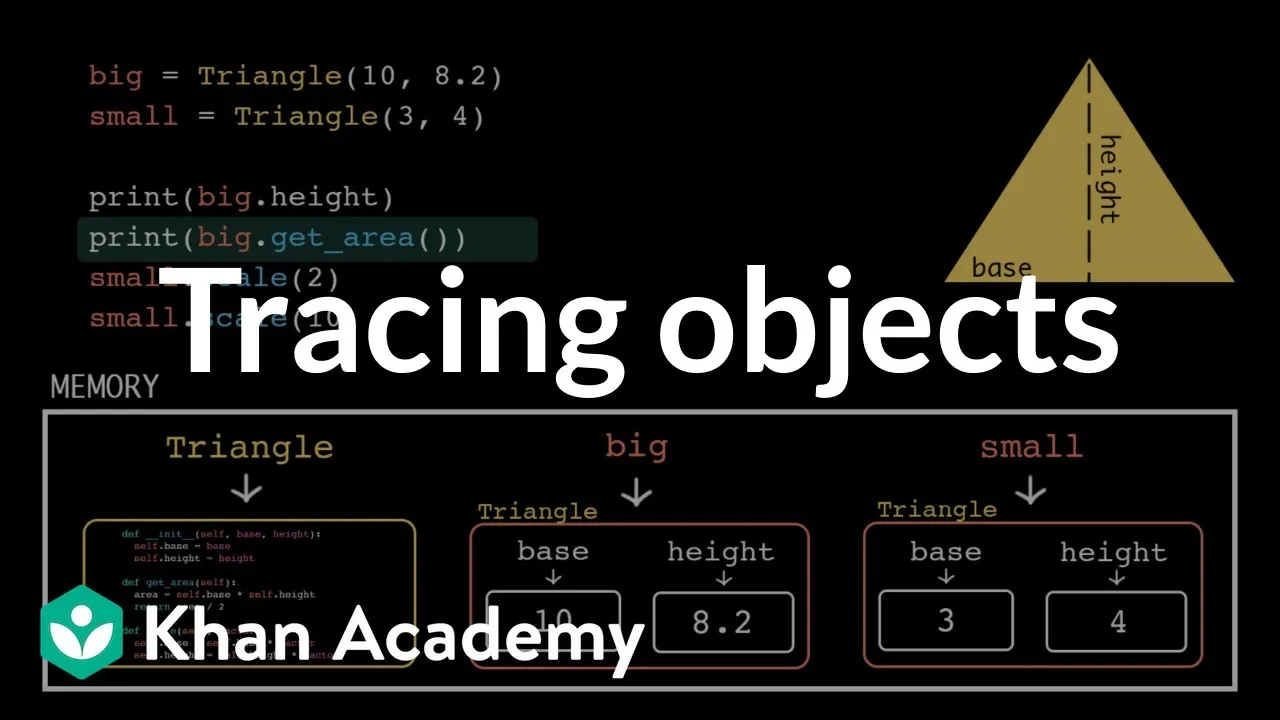
Our program begins with a class definition for a `Triangle`. When Python encounters a class definition, it doesn’t execute the code within it immediately. Instead, it learns about a new type, `Triangle`, and memorizes the methods associated with it (like `__init__`, `get_area`, and `scale`). Think of this as Python storing the blueprint for creating `Triangle` objects.
Step 2: Creating the First Triangle Object
The next line is an assignment statement. Python evaluates the right-hand side first, which involves calling `triangle`. Python looks up the name `triangle` in its memory and finds the class definition. This triggers object creation mode.
- Memory Allocation: Python allocates a space in memory for a new object. This space is initially empty but is designated as being of type `Triangle`.
- Reference to Class: Python stores a reference (or pointer) to the `Triangle` class definition in this new object’s memory space.
- Initialization: Python automatically calls the `__init__` method on this newly created, empty `Triangle` object to initialize it.
Step 3: Executing the `__init__` Method
When a method is called, Python creates a temporary stack frame to manage local variables. For `__init__`, this includes parameters like `self`, `base`, and `height`.
- The `self` Parameter: Python automatically passes the newly created object as the first argument to the `self` parameter. Importantly, Python passes arguments by assignment, meaning `self` points to the original object in memory, not a copy.
- Passing Arguments: The values `10` for `base` and `8.2` for `height` are passed as arguments.
- Attribute Assignment: Inside the `__init__` method, assignment statements are executed:
self.base = base: Python follows the `self` reference to the object in memory and assigns the value of the `base` parameter (10) to an attribute named `base` on that object.self.height = height: Similarly, the value of the `height` parameter (8.2) is assigned to an attribute named `height` on the object.
- Method Exit: Once the `__init__` method finishes, its stack frame is removed, and execution returns to where it was called.
Expert Note: Mutability
User-defined objects in Python are mutable by default. This means that any changes made to the object’s attributes within a method (like `self.base = 10`) directly modify the original object in memory.
Step 4: Assigning a Name to the Object
After the `__init__` method completes, the assignment statement finishes. The name `big` is now attached to the `Triangle` object that was just created and initialized in memory.
Step 5: Creating the Second Triangle Object
The process repeats for creating a second `Triangle` object, which will be named `small`.
- A new, empty `Triangle` object is allocated in memory.
- The `__init__` method is called on this new object, with `self` referring to it.
- Attributes `base` and `height` are assigned to this second object.
- When the `__init__` method exits, the name `small` is attached to this second object.
Step 6: Accessing Object Attributes
Consider the line print(big.height).
- Python looks for the name `big` in memory and finds the first `Triangle` object.
- The dot syntax (
.) tells Python to look for an attribute named `height` *inside* the `big` object. - The value of the `height` attribute (8.2) is found.
- This value is then printed to the console.
Step 7: Calling a Method on an Object (`get_area`)
Let’s trace the execution of print(big.get_area()).
- Python finds the `big` object.
- It looks for a method named `get_area` directly within the `big` object’s attributes. It doesn’t find one.
- Python knows `big` is a `Triangle` object, so it follows the reference to the `Triangle` class definition.
- It finds the `get_area` method definition within the class.
- The `get_area` method is executed. The `big` object is automatically passed as the `self` argument.
- Inside `get_area`:
base = self.base: Python accesses the `base` attribute of the `big` object (which is 10) and stores it in a local variable `base`.height = self.height: Python accesses the `height` attribute of the `big` object (which is 8.2) and stores it in a local variable `height`.- The calculation
(base * height) / 2is performed (10 * 8.2 / 2 = 41.0). - This result is stored in a local variable `area`.
- The method returns the value of `area` (41.0).
- The returned value (41.0) is then printed to the console.
Step 8: Calling a Mutator Method (`scale`)
Now, let’s examine the `scale` method call: small.scale(2).
- Python finds the `small` object.
- It looks for `scale` in the object, doesn’t find it, then looks in the `Triangle` class, and finds the method.
- The `scale` method is executed. The `small` object is passed as `self`, and `2` is passed as `factor`.
- Inside `scale`:
self.base = self.base * factor: Python accesses the current `base` attribute of the `small` object, multiplies it by `factor` (2), and updates the `base` attribute *on the original `small` object* with the new value.self.height = self.height * factor: The same process occurs for the `height` attribute.- The method finishes. The stack frame is removed, but crucially, the `small` object in memory has been directly modified.
Warning: Mutability in Action
Because objects are mutable, subsequent operations on `small` will use its updated `base` and `height` values. If you were to call small.get_area() again, it would reflect these scaled dimensions.
Step 9: Chaining Method Calls
The code then calls small.scale(2) again. This time, the `base` and `height` attributes of the `small` object are already the scaled values from the previous step. The method executes again, further multiplying these existing values by 2, demonstrating how state changes persist.
Step 10: Program Termination
Finally, the program ends. At this point, the `Triangle` objects and any associated data are cleared from memory.
Key Takeaways for Tracing
- The `self` parameter in a method always refers to the specific object the method was called on.
- Use `self` to access and modify the object’s internal state (its attributes).
- Remember that objects are mutable: changes made inside methods affect the original object.
Source: Tracing objects | Intro to CS – Python | Khan Academy (YouTube)