Unveiling the Magic of Virtual Machines
In the realm of computing, a concept often referred to as “magic” by enthusiasts is the virtual machine (VM). Far from being abstract theory, a virtual machine is essentially a computer running within another computer. This powerful technology allows users to simulate an entire hardware environment, complete with its own CPU, memory (RAM), storage, and even network interfaces, all managed by software on a host machine.
Demystifying the Hardware
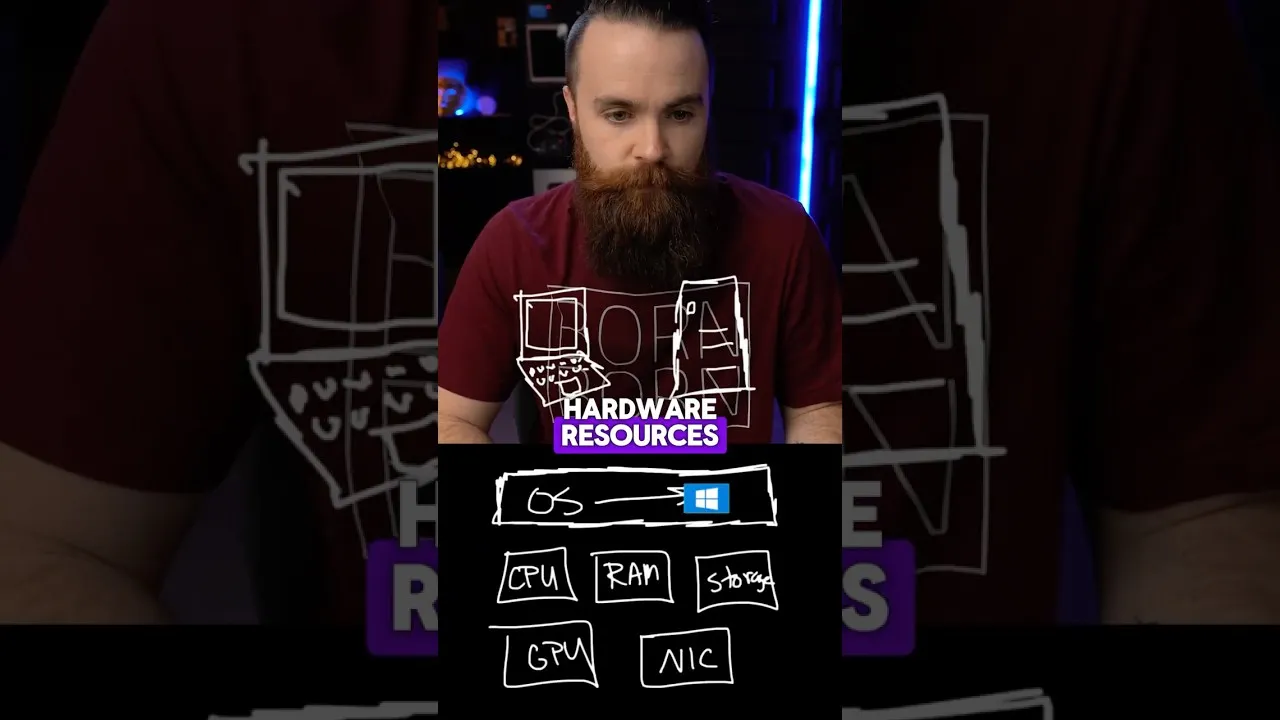
To understand a virtual machine, we first need to appreciate the components of a physical computer. When you open up a typical desktop or laptop, you’ll find essential hardware: the Central Processing Unit (CPU) for calculations, Random Access Memory (RAM) for temporary data storage, storage devices (like SSDs or HDDs) for long-term data, a Graphics Processing Unit (GPU) for visuals, and a network interface card (NIC) for connectivity. However, this hardware, on its own, is inert. It requires an operating system (OS) – such as Windows, macOS, or Linux – to interpret instructions and leverage these physical resources for tasks like gaming, video editing, or browsing the web.
The Need for Multiple Environments
Consider a common scenario: a user primarily works with Windows but decides they want to explore Linux, perhaps for software development, cybersecurity interests, or simply to learn a new operating system. Traditionally, this would necessitate purchasing and setting up a second physical computer. This second machine would then have Linux installed, providing an independent environment for experimentation.
Enter the Virtual Machine
Virtual machines offer a far more elegant and efficient solution. Instead of acquiring new hardware, users can install VM software on their existing computer (the host). This software, known as a hypervisor, creates and manages virtual machines. Each VM acts as a self-contained, independent computer, capable of running its own operating system (the guest OS) and applications, completely isolated from the host system and other VMs.
How the Magic Happens: The Hypervisor
The hypervisor is the core component enabling virtualization. It’s a layer of software that abstracts the host machine’s physical hardware resources and allocates them to the virtual machines. There are two main types of hypervisors:
- Type 1 (Bare-metal): These hypervisors run directly on the host’s hardware, without an underlying operating system. Examples include VMware ESXi and Microsoft Hyper-V. They are typically used in enterprise data centers for maximum performance and efficiency.
- Type 2 (Hosted): These hypervisors run as applications on top of a conventional operating system. Popular examples include VMware Workstation, Oracle VirtualBox, and Parallels Desktop (for macOS). These are commonly used by individuals and developers for testing and experimentation.
When a VM is running, the hypervisor intercepts requests from the guest OS for hardware resources and translates them into commands for the host’s physical hardware. This intricate dance allows multiple operating systems and their applications to run concurrently on a single physical machine, each believing it has exclusive access to its allocated resources.
Benefits and Applications
The ability to run multiple, isolated operating systems on one machine unlocks a wide array of possibilities:
- Software Testing and Development: Developers can test applications across different operating systems and configurations without needing multiple physical machines. This is crucial for ensuring compatibility and identifying bugs early in the development cycle.
- Running Legacy Applications: Businesses can maintain older applications that require specific, outdated operating systems by running them within VMs on modern hardware.
- Security and Sandboxing: VMs provide a secure environment for running potentially untrusted software or visiting suspicious websites. If the VM becomes compromised, the host system remains unaffected.
- Learning and Experimentation: As illustrated by the desire to learn Linux, VMs offer a risk-free sandbox for exploring new operating systems, software, or configurations.
- Server Consolidation: In data centers, VMs allow multiple server workloads to run on a single powerful physical server, reducing hardware costs, power consumption, and physical space requirements.
Popular Virtual Machine Software
Several robust VM solutions are available, catering to different user needs and budgets:
- Oracle VM VirtualBox: A free and open-source option, widely popular for personal use and educational purposes. It supports a vast range of guest operating systems.
- VMware Workstation Player/Pro: VMware is a leader in virtualization. The Player version is free for non-commercial use, while the Pro version offers advanced features for professionals.
- Parallels Desktop: Primarily for macOS users, Parallels offers seamless integration for running Windows and other operating systems alongside macOS applications.
- Microsoft Hyper-V: Built into Windows Pro, Enterprise, and Server editions, Hyper-V is a powerful hypervisor for Windows users.
Why This Matters
Virtual machines have fundamentally reshaped how we interact with computing resources. They have democratized access to diverse computing environments, making it easier and more affordable for individuals and organizations to experiment, develop, and secure their digital operations. From enabling developers to test code on multiple platforms simultaneously to allowing IT departments to consolidate servers and reduce costs, VMs are an indispensable technology in modern IT infrastructure. The “magic” of running a computer within a computer is not just a novelty; it’s a foundational element driving efficiency, flexibility, and innovation across the technological landscape.
Source: Virtual Machines EXPLAINED (This Is the Magic) (YouTube)